¶ Topic
Understanding the architecture of KM8 and where each component is installed and used.
¶ Affected versions
KM8: Premium edition.
¶ Overview
¶ Server
The server is the machine that has the database, the database engine, the database backups, and the license server.
One computer is designated as the server.
In a larger network, this should be a high quality server with appropriate hardware, RAID disk, UPS, and Windows Server 2016 or later.
In small installations it is common to designate a workstation as the server. This comes with some risks:
- Lower quality hardware that is more likely to fail.
- Unlikely to have UPS protection.
- Less likely to be backed up off-site.
- The workstation must be powered on for KM8 to be available to other users on the network.
- Because it is a workstation being used by a person, it is likely to be rebooted causing problems if other users are connected with KM8.
Installation:
When you run the KM8 setup program (KM8Setup.exe), the "Setup type" required is "Server in Premium Edition installation".
Do the server installation before your workstations.
Only one computer is installed as a server.
Do not do a KM8 server installation on more than one computer.
¶ Workstation
You may have as many workstations computers running the KM8 application as you need. The license server implements the maximum number of concurrent users permitted by your license.
Workstations do not have the database, the database engine, the database backups, or the license server.
Workstations connect to the Server using TCP/IP to access the database and license.
Installation:
When you run the KM8 setup program (KM8Setup.exe), the "Setup type" required is "Workstation in Premium Edition installation".
The setup will ask you the name of the computer where you did the server installation "Data server computer name".
¶ Architecture diagram
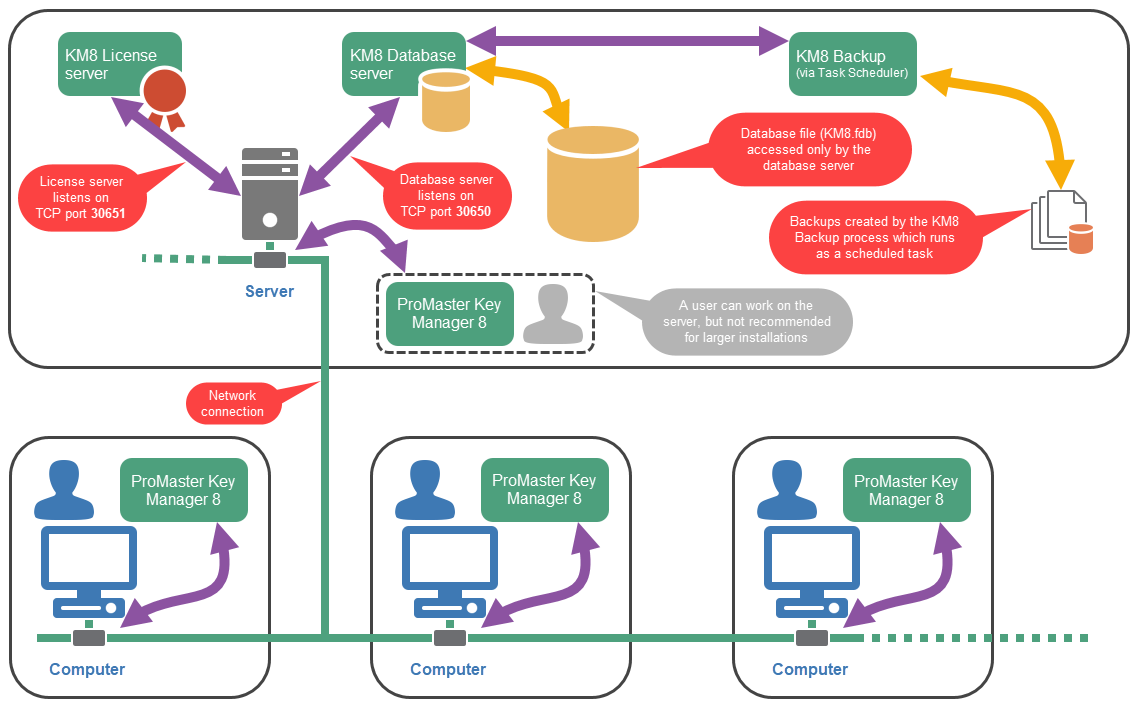
In this diagram, one server and three workstations are shown.
¶ Things to note on the diagram
¶ Server
- The database engine runs and listens on TCP Port 30650.
Only the database engine access the database files. - The license server (KM8LicSvr.exe) runs and listens on TCP Port 30651.
- Firewall information: https://kb.whsoftware.com/KM8/Firewall-requirements
- The backup program (KM8Back.exe) is configured to run as a scheduled task.
It reads the database from the database engine and writes backup files.
See: https://kb.whsoftware.com/KM8/Backup-overview - KM8 (KM8.exe) can run on the server for the user, but not recommended except in small environments.
¶ Workstation
- KM8 (KM8.exe) can run on the workstation for the user.
- KM8 talks to the server listening on TCP Ports 30650/30651.
¶ Questions and answers
| Question | Answer |
|---|---|
| Is KM8 a web-based application? | No, KM8 is a Windows desktop application. In a network installation, each user runs KM8 on their workstation and the application connects to the KM8 server over the local network. |
| Is KM8 hosted by WH Software as a SaaS product? | No, KM8 is installed and hosted in the customer’s own environment. WH Software does not host the customer's KM8 database. |
| Can KM8 be installed on a virtual server? | Yes, KM8 can be installed on a suitable Windows server, including a virtual server, provided the server meets the system requirements and has reliable storage, backup, and network connectivity. See: https://kb.whsoftware.com/KM8/Virtual-environment-installation |
| Can the database be placed on a different drive, such as D: instead of C:? | Yes, the database can be stored on a different local drive on the KM8 server. This can be useful on virtual servers where the database drive may need to be resized independently of the operating system drive. |
| Can I install more than one computer as a server | No, this would not enable the data to be shared. Also, the KM8 license allows a single server install. |